NBA League Pass prices: what to check before paying
For a US fan budgeting for 2026-27, the useful starting comparison is $16.99 a month for standard League Pass and $24.99 for Premium. The NBA's US App Store listing displayed those monthly products when checked on October 13, 2026. Its listed annual products were $109.99 and $159.99; the NBA website also displayed those two amounts for season billing. Check the actual offer in your account before authorizing payment, particularly if you buy through a different country or storefront.
Monthly, season and Premium prices
| Option | Displayed US price | Decision to make |
|---|---|---|
| League Pass monthly | $16.99 | Shorter commitment and a recurring bill |
| League Pass season | $109.99 | Upfront payment for the stated season term |
| Premium monthly | $24.99 | Premium features with monthly billing |
| Premium season | $159.99 | Premium features with an upfront season payment |
Use this table as a comparison baseline, rather than a promise that every subscriber will see the same checkout. The NBA publisher's US app listing names purchasable products; an account-specific offer determines what you can actually buy. A promotion, a renewal offer and a regular new-customer price can all describe different transactions. Also check whether tax is included and which currency appears beside the amount.
The words season and annual deserve particular attention. Buying access late in a basketball season does not automatically turn a season product into twelve new months of live regular-season games. Conversely, a store's annual subscription can have its own renewal timetable. Read the term attached to your selected product, rather than assuming that every page uses the same label for the same billing arrangement.
Keep the receipt and take a note of the next charge date. That small step is more useful than memorizing an advertised discount percentage: it tells you what you purchased, who collected the payment and when you need to make the next decision. Start with the official package page, then compare any partner offer against the same plan and billing period.
When season billing beats monthly payments
At the baseline prices above, season billing becomes cheaper than paying for seven monthly cycles. It does not beat six. That distinction matters if you plan to join after Opening Night, stop before the regular-season finish or spend several weeks away from basketball. The best-priced package is the one covering your actual viewing window at the lowest total cost.
| Payments | Standard total | Premium total |
|---|---|---|
| Three monthly cycles | $50.97 | $74.97 |
| Six monthly cycles | $101.94 | $149.94 |
| Seven monthly cycles | $118.93 | $174.93 |
| Season baseline | $109.99 | $159.99 |
These are calculations, not additional offers. They exclude tax and discounts and assume an unchanged monthly price. Seven standard payments exceed the season baseline by $8.94; seven Premium payments exceed it by $14.94. Six payments cost $8.05 and $10.05 less, respectively. A relatively small saving should not decide the purchase if one option provides a billing term that does not fit your plans.
Count billing cycles, not calendar months
The NBA's renewal policy describes direct monthly renewals every 30 days. Count the charges between the day you subscribe and the day you intend to stop. Touching parts of October through April is not, by itself, proof that you need seven payments. Put your intended start date and each renewal date on a calendar, then check the account's displayed paid-through date.
For an eligible monthly subscription bought directly from NBA.com, the league also offers a pause lasting one to four months. Access continues until the current period finishes, then stops during the pause; billing resumes automatically afterward. The NBA says season plans and third-party purchases do not qualify for that pause. A pause also does not freeze a promotional discount's original expiry date.
Consider a fan joining for a three-month stretch of road games. Monthly billing provides a defined short commitment, while season billing pays for additional months that may go unwatched. A fan who wants full-game replays throughout the summer may value access differently. Price that extra use deliberately instead of counting only live regular-season evenings, and confirm the exact access end date attached to the offer.
What the Premium upgrade actually changes
Premium adds $8 to the monthly baseline or $50 to the season baseline. Decide whether its features solve a problem you actually have: competing screens, watching without a connection, or preferring the arena presentation during breaks. Paying the higher price does not change the live-game blackout rules.
Three devices and four games are different limits
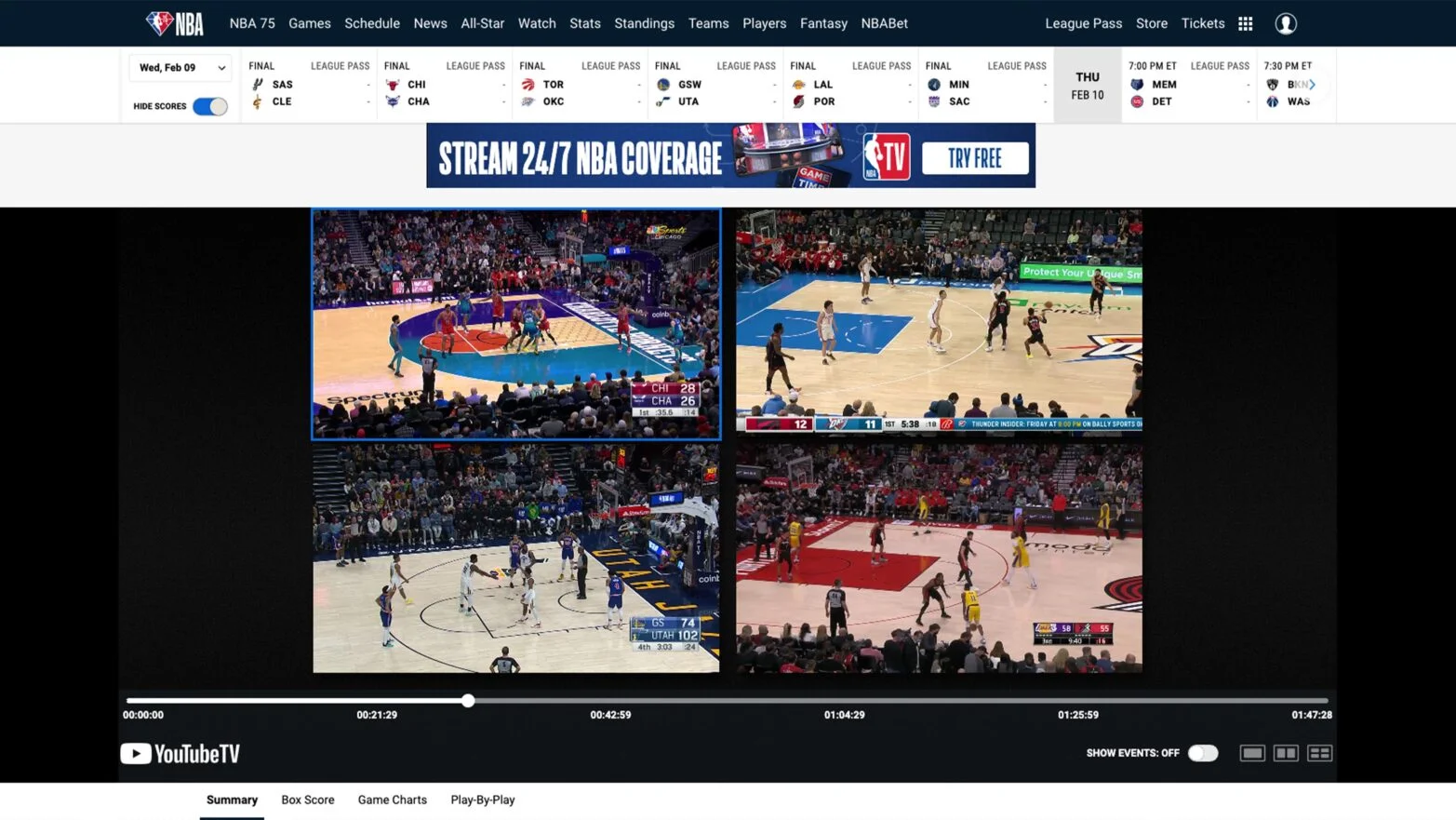
Standard League Pass permits streaming on one device at a time; Premium raises that limit to three. Multiview is a separate feature that puts more than one live matchup inside a supported player. You do not need Premium merely because you want to follow several games on one compatible screen. Conversely, four game panels on a computer do not mean four people can simultaneously sign in on four separate devices.
The NBA's October 6, 2026 Multiview guide lists four games for NBA.com, but limits differ across connected hardware. Check your exact model before paying for an upgrade or buying a television device. A household that routinely watches two different matchups on separate screens has a clearer reason to consider Premium than a solo viewer who simply wants a second score in view.
Downloads and the in-arena feed
Premium also supports downloads in the NBA mobile and tablet app. The league's download instructions say saved games expire after 30 days. This is useful for catching a West Coast game on the next morning's commute, provided the game is available and the download finishes before you lose internet access. It is not a permanent personal archive.
Before a flight, open the saved video and check that it plays. A full game, a condensed replay and a quick recap serve different purposes: choose the full broadcast when you want to watch rotations develop, or a shorter version when you only have a limited window. Storage and preparation matter more here than the number of games advertised in the package.
The in-arena stream offers arena activity during commercial breaks. Treat that as a presentation preference, not a promise that every logo, sponsor message or piece of broadcast branding disappears. If you usually skip through replays and watch alone, the $50 season upgrade may buy very little that changes your routine. If you watch live on multiple screens and travel regularly, it has a much more tangible use.
Check blackouts before valuing the subscription
The price comparison only becomes meaningful after you establish which games the subscription can deliver where you watch. In the United States, the NBA's October 2026 blackout guidance excludes local-team broadcasts and nationally televised games from live League Pass access. It lists national replays for 6 a.m. Eastern the next day and local replays three days after the broadcast finishes. Those are different waiting periods, so do not build a next-morning routine around every local game.
A road game involving your local team can still be a local blackout. The arena's location is not the deciding factor. For example, a Lakers supporter inside the team's home television territory should investigate the eligible local viewing route, such as Spectrum SportsNet+, rather than assuming League Pass supplies the Lakers because they are playing in another city. The NBA describes that local subscription separately and retains national-game restrictions.
Use the NBA TV schedule to mark ten upcoming games you actually want to watch. For each, record the date, broadcaster and whether your location is eligible for League Pass. Then separate live priorities from games you are happy to replay later. This small sample makes the purchase concrete without pretending that a single television label guarantees access in every ZIP code.
As an illustrative budget exercise, a $16.99 month used for ten eligible games costs about $1.70 per game watched. Used for only two, it costs about $8.50 each. These are personal viewing calculations, not NBA per-game prices. They are a better measure of value than dividing the bill by every game played across the league, most of which you may never open.
Also budget separately for the postseason viewing route you need. The official blackout guide says US playoff and Finals games are unavailable live through League Pass. Buying Premium does not remove that restriction. International availability differs, and location changes can affect access when travelling. Check the destination and device before relying on an existing subscription for an important game away from home.
Choose the purchase route that you can manage
A cheaper-looking checkout is not automatically a better purchase if you cannot tell who controls the subscription afterward. Before paying, identify the seller, the exact tier, the renewal period and the account that will hold the entitlement. You should be able to answer all four without relying on a promotional headline or a remembered offer from a previous season.
NBA.com, app stores and television providers
The NBA supports purchases through its website, selected app stores and participating television or international partners. Availability varies by market. Buying on a phone does not always mean the NBA handles the bill: the store account used for an in-app transaction may be the place where you must later manage it. Similarly, a provider-billed package remains a provider account matter even when you watch inside the NBA App.
The practical choice is between a direct account you manage on NBA.com and a seller whose billing system you already use. Compare the total payable for the same tier and duration. A monthly introductory price cannot be compared fairly with a full-season payment unless you add the later recurring charges. Check the offer's renewal amount, not just the first transaction.
After an Apple or Google purchase, the NBA's subscription syncing guide describes restoring the purchase in the app. Use the store account that actually paid and the NBA ID you intend to keep using. If a television suddenly asks you to subscribe again, first investigate sign-in and entitlement syncing. A second payment can create a second subscription while leaving the original access problem unresolved.
Provider activation also deserves a little lead time. The NBA warns that subscriptions bought through participating US television providers can take up to three days to become available on NBA digital platforms. Test access before the first game you care about. Keep the order number, purchase date and seller name available if support needs to trace the entitlement.
Finally, distinguish cancellation from deleting the app. Removing an icon does not tell the payment seller to stop renewing a subscription. Find the management page immediately after purchase and record its location with your receipt. You do not have to cancel then; knowing the route simply makes the eventual decision deliberate. That is especially useful if you are testing one paid month before deciding whether a longer commitment fits your viewing habits.
A buying checklist for three kinds of NBA fan
If you follow one team from outside its market: begin with standard League Pass and compare Team Pass if that option appears in your account. The NBA describes Team Pass as access focused on the selected team's eligible games, still subject to blackouts. A small price difference may be worth paying if you also enjoy watching the team's rivals, possible playoff opponents or a promising rookie on another club. Check the live offer instead of carrying forward a Team Pass price from an old review.
If you watch several teams every week: standard season billing is a sensible starting point when your expected paid cycles make its total cheaper. Upgrade to Premium only when the extra devices, downloads or arena presentation have an identifiable role in your routine. For example, a viewer who watches a full early game and then a late fourth quarter on one laptop may already have the tools needed in the standard tier.
If you want one matchup or a brief stretch: check whether an eligible Single Game purchase or a monthly plan suits the occasion. The NBA makes Single Game purchases available through its mobile app for eligible current-season games; blackout restrictions still apply. Compare the offer on the game screen with the monthly total before deciding. Buying a single game is not a way to make an otherwise restricted live broadcast available.
Before paying for any of those routes, open today's NBA schedule and identify a game you can use to test playback. Check the device you will actually use, the correct account and the stream available in your location. A successful sign-in is useful, but completing a few minutes of video playback is a better practical check of the whole setup.
Then check discounts only if you meet their published conditions. Student promotions, for example, have country and verification requirements; an offer described on an international support page should not be assumed to apply to a US account. A free trial is similarly something to confirm in checkout, including its end date and subsequent charge, rather than a permanent feature to expect.
Your final notes should contain the plan name, total charge, next billing date, anticipated live games and cancellation route. With those five items clear, choosing monthly, season or Premium becomes a straightforward comparison. Revisit it when your circumstances change: moving into your team's market, watching on more screens or losing several weeks of viewing time can alter the value more than a small difference in the advertised price.
Sign in with Google to join the discussion.